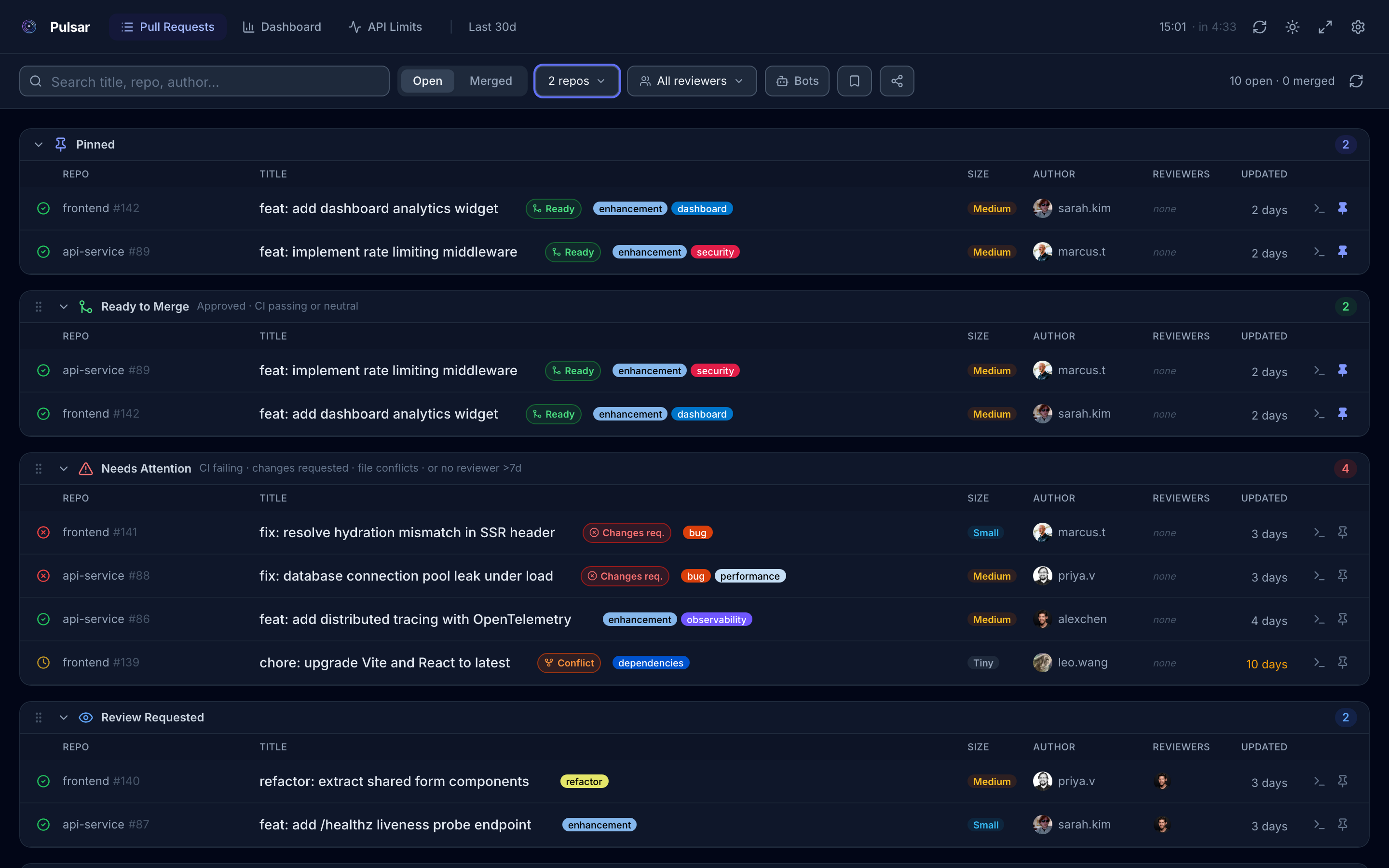
There is a particular kind of fatigue that comes from context-switching between repositories just to check the state of your team's pull requests. GitHub's own interface was built for individual repos. Once you are managing a multi-repo system, or even just tracking your own work across a few projects, it stops scaling.
Pulsar is my answer to that problem. It is a free, open-source pull request dashboard that runs entirely in your browser, with no backend, no account, and no data leaving your machine.
What it does
Pulsar connects to the GitHub API using a personal access token you supply, then pulls together all the pull requests you care about across however many repositories you add. The result is a single view, automatically sorted into sections that reflect the actual state of work:
- Ready to Merge: approved, CI green, no conflicts
- Needs Attention: blocked, failing, or surfacing a conflict
- Review Requested: waiting on you specifically
- My PRs: your open work
- Drafts: in-progress, not yet ready
Smart conflict detection escalates problematic PRs automatically. You do not have to scan for them.
The engineering view
Beyond the status triage, Pulsar surfaces the metrics that tell you whether your delivery system is actually working:
- Cycle time: how long PRs take from open to merge
- Time to first review: where review lag concentrates
- PR velocity: throughput over time
- Contributor activity heatmap: weekly intensity per team member
- Review workload: who is carrying the review burden
These are not vanity metrics. They are the leading indicators of whether a team's review process is a bottleneck or a healthy checkpoint.
How it is built
The architecture is deliberately simple. Pulsar runs entirely client-side. Your PAT and repository data are stored in your browser's localStorage only, nothing is sent to any server I operate. There is no backend to maintain, no SaaS subscription to manage, and no privacy policy to read carefully.
Getting started takes about two minutes:
- Generate a GitHub PAT with
repoandread:orgscopes - Add your org, a repo prefix, or specific repositories
- Pulsar fetches directly from the GitHub API
It supports GitHub.com and GitHub Enterprise, multiple organisations, and personal accounts. The number of repositories is unrestricted.
The small details
A few things I built that I use daily:
The quick checkout button copies the exact gh pr checkout command for any PR to your clipboard. It sounds trivial. It saves a meaningful amount of time across a working week.
Shareable workspace links let you send a filtered view of your board to a colleague, with a preview modal so they can see what they are opening before they load it.
Named filter presets mean you can switch between "backend team" and "frontend team" views with one click, rather than re-selecting reviewers every time.
The PR lifecycle timeline shows the sequence of events for a single PR: opened, first review, approval, merge, which makes it easy to spot where a specific piece of work stalled.
Why open source
I built Pulsar to solve my own problem, and I made it open source because the right home for a tool like this is in the hands of the people who use it. If you hit a limitation, you can fix it. If you have a workflow I have not thought of, you can extend it.
The source is on GitHub. Contributions are welcome.
Pulsar is free and available now at pulsar.arkham-advisory.com.